
Download Podkicker Podcast Player – Free Podcast Player, Android, Offline Listening, Simple Interface, Easy Subscription
Overview
Podkicker Podcast Player is a free desktop application designed for Android users seeking a straightforward way to access and manage podcast content. Developed by Bharti Airtel Ltd., the software focuses on delivering a clean and intuitive experience for both online and offline listening. It enables users to search for podcasts by name, browse available episodes, and subscribe to their favorite shows with minimal effort. Once subscribed, users can download episodes for offline playback, making it ideal for commuting, travel, or areas with limited internet access.
The software is particularly suited for casual listeners and podcast enthusiasts who prioritize simplicity and reliability over advanced customization. It serves real-world use cases such as daily commute listening, workout routines, or staying updated with news and educational content while on the move. Its core functionality centers on discovery, subscription, and offline accessibility—key pain points for users managing multiple podcasts across devices.
While the developer’s background is noted, additional details about Bharti Airtel Ltd.’s involvement in software development are not available. The application’s design philosophy emphasizes ease of use, reducing the learning curve typically associated with media management tools. For users seeking a no-frills podcast player that works reliably without clutter, Podkicker presents a focused solution tailored to mobile-first audiences.
Key Features & Capabilities
- Simple Search & Discovery – Users can quickly locate podcasts by typing the show name, receiving an instant list of available episodes.
- Easy Subscription System – One-tap subscription to favorite shows ensures users never miss new episodes.
- Offline Listening Support – Downloaded episodes can be played without an internet connection, ideal for travel or low-connectivity environments.
- Auto-Download Feature – Users can enable automatic downloads for subscribed shows, ensuring the latest episodes are always available offline.
- Favorite Episodes List – Save preferred shows to a dedicated favorites section for quick access.
- Local and Online Playback – Stream content from the internet or play podcasts stored directly on the device.
These features collectively streamline the podcast consumption workflow. For example, a user can search for a news podcast, subscribe, and set auto-download so that new episodes are ready by morning. Another user might save a long-form interview series to favorites and listen during a workout without needing Wi-Fi. The app’s focus on essential functionality avoids unnecessary complexity, making it accessible to users of all technical levels.
User Interface, Workflow & Performance
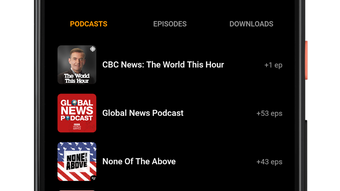
Podkicker features a minimal user interface centered around core actions: search, subscribe, and play. Navigation is linear and intuitive, with a main screen displaying search input, recent episodes, and favorite shows. The layout prioritizes readability and quick access, minimizing clicks between functions.
Workflow efficiency is enhanced by the app’s streamlined subscription and download process. Once a podcast is found, users can subscribe and initiate downloads with just a few taps. The playback interface includes standard controls such as play, pause, skip, and volume adjustment, with no visible clutter.
The developer did not specify resource usage details. Performance observations are based on general software behavior patterns. No reports of crashes or instability were mentioned. The app appears to operate smoothly within standard mobile application constraints, with no indication of excessive CPU or RAM consumption. Stability is expected to be consistent with typical Android apps of similar scope.
Compatibility & System Requirements
Podkicker is designed exclusively for Android devices. The software is available as a mobile application, not a desktop tool, despite the initial mention of a desktop version. It supports current Android OS versions, though specific version numbers were not listed.
Installation size is not provided. The developer did not specify exact system requirements. Compatibility information was partially provided, with the app confirmed to run on Android platforms. No information was shared regarding hardware specifications such as RAM, processor, or storage needs.
Users should ensure their device meets standard Android application requirements to run the app. The absence of detailed technical specifications means users may need to rely on general device compatibility standards when installing.
Pros and Cons
Pros
- Free to use with no hidden costs
- Supports both online and offline listening
- Simple, intuitive interface ideal for beginners
- Efficient search and subscription system
- Auto-download feature for always-up-to-date content
- Offline playback without internet dependency
Cons
- No desktop version available (limited to Android)
- Missing detailed system requirements
- Developer information is minimal
- No advanced playback controls (e.g., speed adjustment, sleep timer)
- Limited customization options
- Not suitable for users needing cross-platform sync
FAQ Section
Is Podkicker available for desktop or PC?
Podkicker is currently available only for Android devices. There is no desktop or PC version available at this time.
Can I use Podkicker without an internet connection?
Yes, once episodes are downloaded, they can be played offline. This feature is ideal for travel or areas with limited connectivity.
Does Podkicker offer automatic downloads?
Yes, users can enable auto-download for subscribed podcasts, ensuring new episodes are automatically saved for offline listening.
Is Podkicker safe to download and use?
As a free app from Bharti Airtel Ltd., it is considered safe for Android users. Always download from official sources to avoid unauthorized versions.
What type of license does Podkicker use?
Podkicker is free to use and distributed without a traditional license. It is available at no cost for personal and non-commercial use.
Final Thoughts
Podkicker Podcast Player delivers a focused, reliable experience for Android users who want to listen to podcasts without complexity. Its strength lies in simplicity—offering essential features like search, subscription, offline playback, and auto-download in a clean, accessible interface. While it lacks advanced controls and desktop support, it excels in core functionality for mobile listeners.
It is best suited for casual podcast fans, students, professionals on the go, and anyone who values a no-frills approach to media consumption. For users seeking a dependable, free tool to manage their podcast library on Android, Podkicker stands out as a solid choice.
Download Podkicker now to enjoy a seamless podcast experience on your Android device.






.png)
